Expression
This parameter is used to define a tensor field of type “thermal source density” by means of a Python expression within the .jcm input file. The syntax is the following:
ThermalSourceDensity {
  Python {
     Expression = " ... # your python scripting
                    ...
                    value = ... # set return value

                   "

     # define one or more parameters
     Parameter {
       Name = "Para1"
       ...
     }
     Parameter {
       Name = "Para2"
       ...

     }
  }
}
The string value Expression has to be valid Python code and is interpreted in the following way:
The NumPy-package is automatically imported when evaluating the expression.
Any parameter as defined by a
Parametersection is available within the Python expression as an NumPy object named accordingly to the value of the parameter Name.The position
 and the time
  are available as NumPy objects name
 Xandtrespectively.For time-harmonic electromagnetic problems the angular frequency
 can be addressed by
 EMOmega, (EMstands for electromagnetic).The expression must define a NumPy object named
valuewhich contains the return value of appropriate shape (thermal source density is a scalar).Keep in mind the Python indentation rule.
As a practical example we want to define an inductive heat source stimulated by the presence of an time-harmonic electric field  in a lossy medium with electric conductivity tensor
  (c.f. ElectricConductivity):
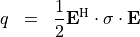
This tensor field has two field parameters, namely the electric field strength and the electric conductivity tensor  . It may be defined as follows:
ThermalSourceDensity {
  Python {
    Expression = "sigmaE = dot(sigma, E)
                  E_conj = E.conj()
                  value = 0.5*dot(E_conj.T, sigmaE)"

    Parameter {
       Name = "E"
       FieldValue {
         FieldBagPath = ... # path to an electric field
         Quantity = ElectricFieldStrength
       }
     }
     Parameter {
       Name = "sigma"
       FieldValue {
         Quantity = ElectricConductivity
       }
     }
   }
 }
Since the FieldBagPath tag is missing within the last parameter section, the default value "./" is used. This means that the definition of the electric conductivity is taken from the materials.jcm file located in the same directory.