Boxes
Learning targets
Construct Boxes as a 3D Primitive
Apply rotations
This example constructs two sets of two boxes. The first two boxes are fused together with one box rotated and translated. A rotation of the fused object can be achieved by using a
BooleanOperationwith the operator fuse. The remaining boxes are stacked with a slight offset. Due to different priorities the grey box cuts out the part of the red box where both boxes overlap.
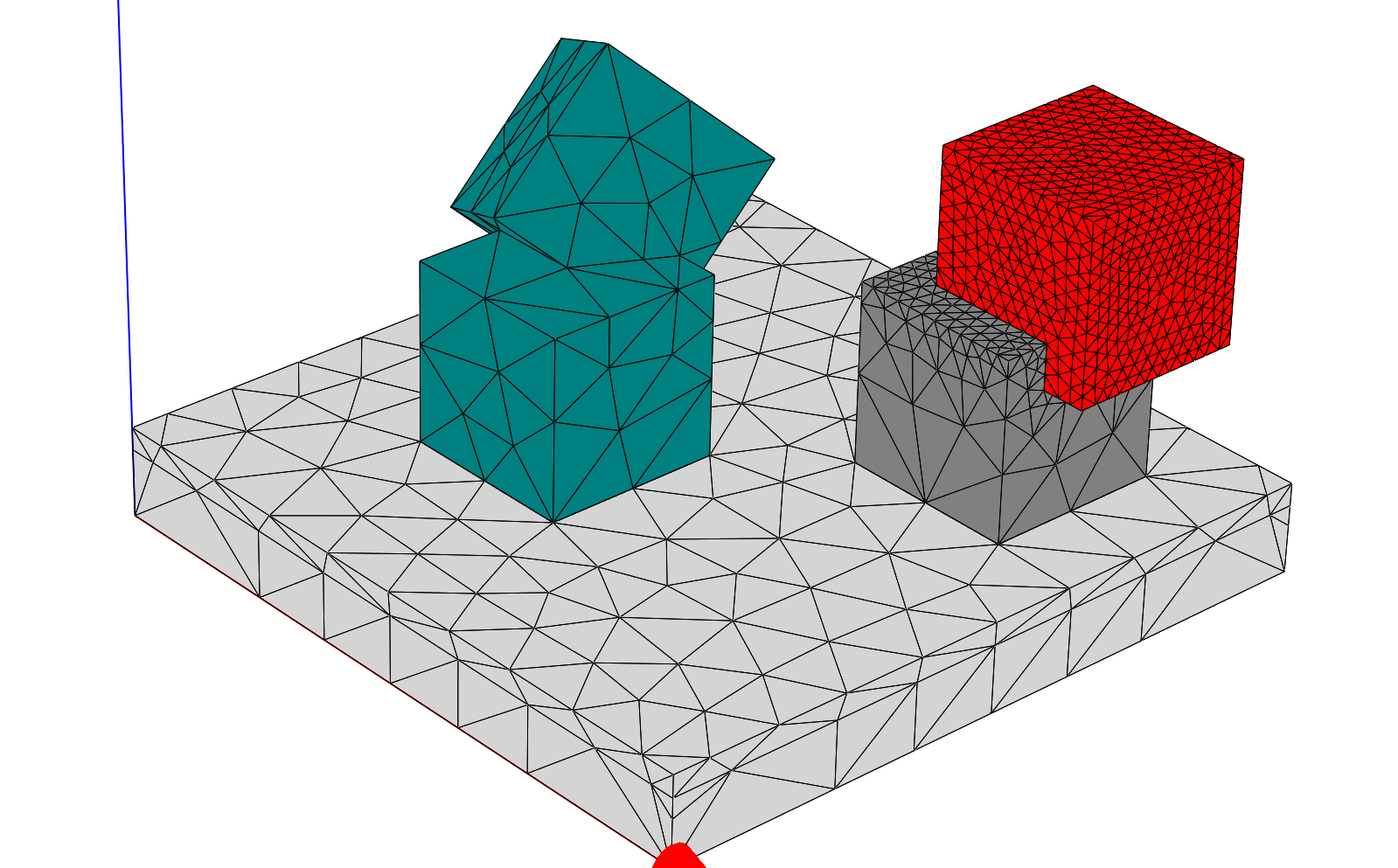
.jcm Input File
The layout.jcm file contains a Layout3D section indicating the use of 3D primitives. The substrate and background are defined first, then the object section with the four boxes follows. The box has three parameters (Length, Width and Height) in addition to the primitives GlobalPosition and Rotation shared with all 3D primitives.
Note
The parameters of the Box define the side lengths along positive coordinate axis. The GlobalPosition thus refers to the lower left corner.
layout.jcm [ASCII]
 1Layout3D {
 2  UnitOfLength = 1.0
 3  BoundaryConditions {
 4    Boundary {
 5      Direction = All
 6      Class = Transparent
 7    }
 8  }
 9  Extrusion {
10    Objects {
11      Parallelogram {
12        Priority = -1
13        DomainId = 101
14
15        Height = 8.0
16        Width = 8.0
17
18        MeshOptions {
19          MaximumSideLength = 2.0
20        }
21      }
22    }
23    MultiLayer {
24      LayerInterface {
25        BoundaryClass = Transparent
26        ExteriorDomainId = 10
27      }
28      Layer {
29        Name = "Substrate"
30        Thickness = 1.0
31        DomainIdMapping = [101 10]
32      }
33      Layer {
34        Thickness = 7.0
35        DomainIdMapping = [101 1]
36      }
37      LayerInterface {
38        BoundaryClass = Transparent
39        ExteriorDomainId = 1
40      }
41    }
42  }
43  Objects {
44    Box  {
45      Name = "Box1"
46      DomainId = 2
47      Priority = 1
48      GlobalPosition = [-2.0,-2.0,1.0]
49      Height = 2.0
50      Length = 2.0
51      Width =  2.0
52      MeshOptions  {
53        MaximumSideLength = 1
54      }
55    }
56    Box {
57      Name = "box2"
58      DomainId = 2
59      Priority = 1
60      GlobalPosition = [-1.5,-1.5, 3.5]
61      Rotation = [1.0 0.0; 3.0 1.0; 1.0 1.0]
62      Height = 2.0
63      Length = 2.0
64      Width =  2.0
65      MeshOptions  {
66        MaximumSideLength = 2
67      }
68    }
69    Box  {
70      Name = "Box3"
71      DomainId = 3
72      Priority = 3
73      GlobalPosition = [1.0,1.0,1.0]
74      Height = 2.0
75      Length = 2.0
76      Width =  2.0
77      MeshOptions {
78        MaximumSideLength = 1
79      }
80    }
81    Box  {
82      Name = "box4"
83      DomainId = 4
84      Priority = 1
85      GlobalPosition = [1.5, 1.5, 2.5]
86      Height = 2.0
87      Length = 2.0
88      Width =  2.0
89      MeshOptions  {
90        MaximumSideLength = .2
91      }
92    }
93  }
94}
Note
3D objects are not allowed to touch the computational domain. Hence the Layer Substrate is introduced.